I have been on the buying side of this decision eleven times, six for companies I worked at and five as an outside consultant. The pattern that has held every single time: the team that picked the product with the best demo regretted it, and the team that picked the product their reps would actually open was still using it three years later.
So this is not a ranked list. Ranked lists are easy to write and almost useless to read, because the ranking depends on facts about your company that no article knows. What follows is the process I would run, plus the specific things I have seen go wrong often enough to warn about.
Start with the job, not the product
Before you look at a single vendor, write one sentence describing what you need the system to do. “Track our pipeline and remind us to follow up” is a different requirement from “route leads to the right rep by territory and give the VP a forecast she can defend.” Those two sentences lead to different products, different budgets, and different rollout plans.
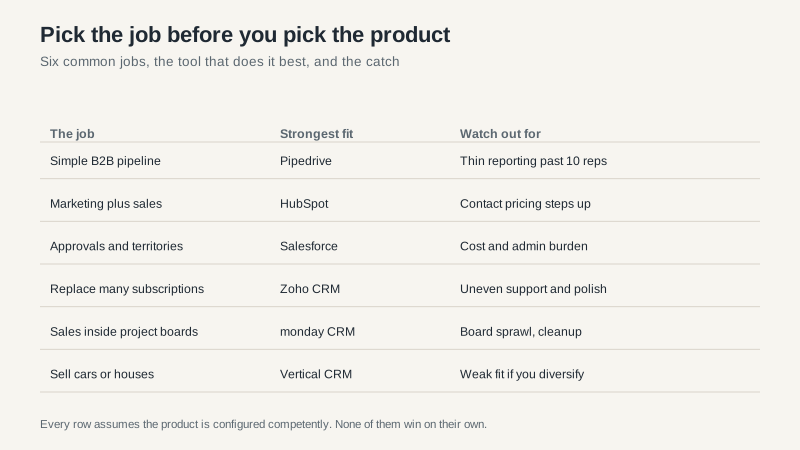
The most common mistake is choosing a product for a job you do not have. A 12-person agency does not need territory management. A 200-seat sales floor does not need a kanban board with three columns. Buy for the job in front of you and accept that you may outgrow it.
The evaluation criteria that actually predict success
Five things decide whether a CRM works, roughly in this order.
Process fit. Can the system represent how you actually sell, without a consultant rebuilding it? If your deal has to pass through a discount approval and a legal review before it closes, the system should model that, not force you to fake it.
Rep effort. How many clicks and fields stand between a rep and logging a call? Every extra required field is a small tax, and reps respond to taxes the way anyone does. This is the single most underrated criterion in every evaluation I have sat in.
Reporting. Can you build the report your CEO asks for on a Monday morning without exporting to a spreadsheet? Test this before you buy, not after.
Total three-year cost. Subscription, implementation, integrations, admin time, and the cost of the person who maintains it. Year-one pricing is a sales tactic, not a budget.
Exit terms. What happens to your data when you leave, and what does it cost to take it? This is the criterion nobody checks and everybody regrets.
What the products are actually good at
I will not pretend these are equivalent. They are not, and the differences are consistent.
HubSpot is the best product for a company that wants marketing and sales in one place and values speed of setup over depth of customization. Its pricing model is the thing to understand before you commit, and I wrote about that separately in the HubSpot CRM breakdown.
Salesforce is the best product for a complex sales organization with the budget and patience to configure it properly. It will outlast almost any other choice, and it will cost the most to get there. Editions and cost structure are covered in the Salesforce CRM guide.
Pipedrive is the best product for a team that sells on activity and wants a tool that gets out of the way. If your process is simple and your reporting needs are modest, it is faster and cheaper than either leader.
Zoho is the best product for a company that wants breadth on a budget. You get a lot for the money, and you accept less polish and more inconsistency in support.
monday CRM is the best product for a company already living in monday.com, where removing a tool boundary is worth more than any feature. The monday CRM review covers where the flexibility turns into work.
The questions that expose a bad fit in fifteen minutes
Ask each vendor to show you, live and without slides, how their system handles your three ugliest deals. Not your cleanest. The one with a partial delivery, the one where the buyer changed companies halfway through, the one that has been “closing next month” since March.
Then ask what happens when two reps claim the same account. Ask how a discount approval routes. Ask who can delete a record, and whether the deletion is recoverable. Ask what a report looks like when someone changes a picklist value six months from now, because that is where historical reporting quietly breaks.
The answers separate a product that was designed for sales from a product that was designed for a demo.
What buyers regret, in order
I keep a running list from post-purchase conversations, and the ordering has not changed in years.
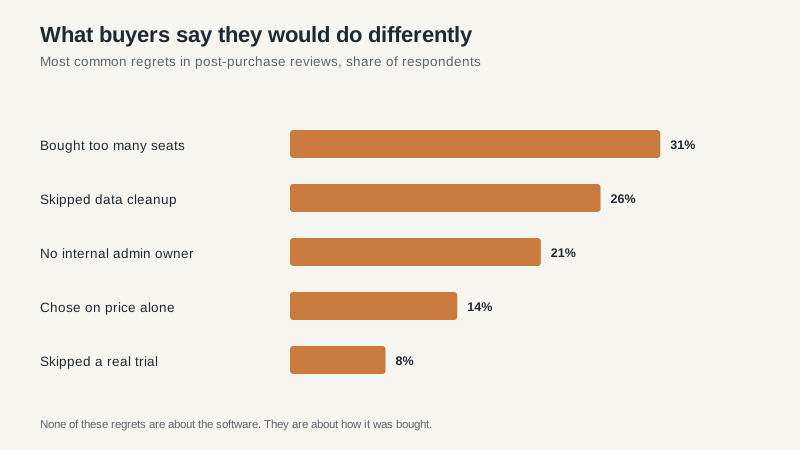
Notice that not one of those is “we picked the wrong software.” The failures are almost always purchasing and ownership failures. Companies buy 40 seats for 22 users because the volume discount made it look cheaper. They skip data cleanup because it is tedious, then spend a year fighting duplicates. They never name an internal owner, so the system drifts.
The seat one is worth dwelling on. A volume discount that brings your per-seat price down 15% while you buy 80% more seats than you need is not a discount. It is a bigger invoice with a smaller number on the line you were looking at.
The rollout that survives contact with a sales team
Launch with one pipeline and one report. Load only live accounts. Train in small groups, on real deals, with the person who will administer the system sitting in the room.
Then protect the first ninety days. Pick two reps who are respected rather than compliant and make sure their experience is good, because the rest of the team will follow the respected reps and ignore the announcement email. If the system is slow or the fields are wrong, fix it in week two, not quarter two.
And measure adoption honestly. Logins are vanity. The number that matters is the share of open deals with a next step and a date. If that number is above 80%, you have a working CRM. If it is below 50%, you have an expensive contact database and a process problem to solve.
My honest recommendation
If you are under 50 people and sell B2B, start with HubSpot unless something specific rules it out. If you are over 100 reps or have genuinely complex approval and territory structures, start with Salesforce. If your process is simple and you want the least friction, look hard at Pipedrive before you assume you need more.
Then spend twice as long on rollout as you spent on selection. The selection is a few weeks. The rollout is what determines whether the money was worth it, and it is the part almost every buyer rushes.
If you are earlier than that and the budget is tight, our guide to free CRM options for small business covers where the free tiers stop being enough. If you are coming at this from a different angle entirely, the overview of customer relationship management explains what the system is supposed to do before you buy one.
