The first Salesforce implementation I ran was for a 40-person software company that had already bought 25 Enterprise licenses before anyone mapped a single process. The license decision took a lunch. The implementation took seven months and cost more than the three-year subscription. That ratio is normal, and almost nobody is warned about it.
Salesforce CRM is the most capable sales platform on the market and the easiest one to overbuild. Both statements are true at once. What follows is what I would want a friend to tell me before signing, written from the vendor calls, the partner negotiations, and the rebuilds I have done on the other side.
The editions, and where each one actually runs out of road
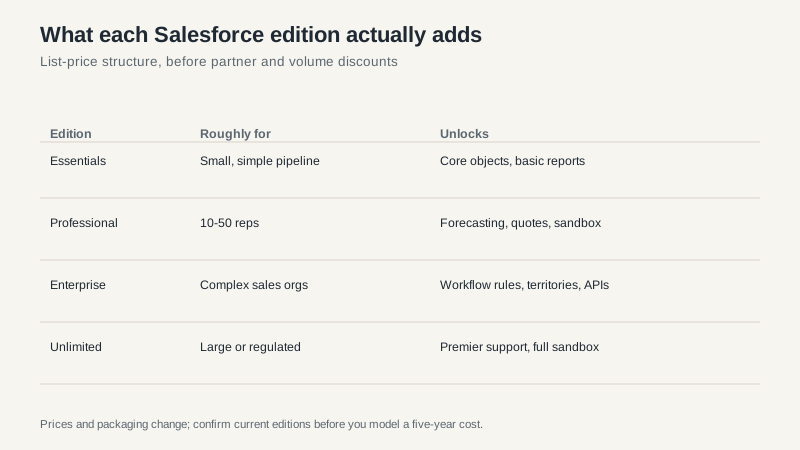
Salesforce sells the same core product at four main tiers. The jump between them is not about features you can see in a demo. It is about the plumbing underneath.
Essentials is for small teams with one pipeline and no integrations. It is genuinely fine for a five-person sales floor. It also hits a wall fast: limited automation, limited customization, and a reporting layer that frustrates anyone who has used a spreadsheet pivot table.
Professional is where most 10 to 50 person teams land. You get better forecasting, quotes, and a sandbox for testing. The sandbox is the underrated item on that list. Without one, every change happens in production and every mistake is a live mistake.
Enterprise is the tier Salesforce actually builds for. Workflow rules, territory management, profiles and permission sets, and API access that is generous enough to run real integrations. Most of the “Salesforce is expensive” complaints trace back to a company that needed Enterprise capabilities and bought Professional, then paid a partner to work around the gap.
Unlimited adds support and sandbox capacity rather than core functionality. If you are buying it for the features, look again at the feature list.
What it costs over five years
List price per user per month is the number everyone quotes and the number that matters least. As of this writing, the four editions run roughly $25, $80, $165, and $330 per user per month, billed annually. For 25 users on Enterprise, that is a little under $50,000 a year before anything else.
Then the rest of the bill arrives.
Implementation for a first deployment usually runs between one and two times annual subscription. A $50,000 subscription with a $95,000 implementation is not unusual. Integrations add more. So does the admin you will eventually hire, because a system this configurable does not maintain itself, and the person who built it in year one has a habit of leaving in year three.
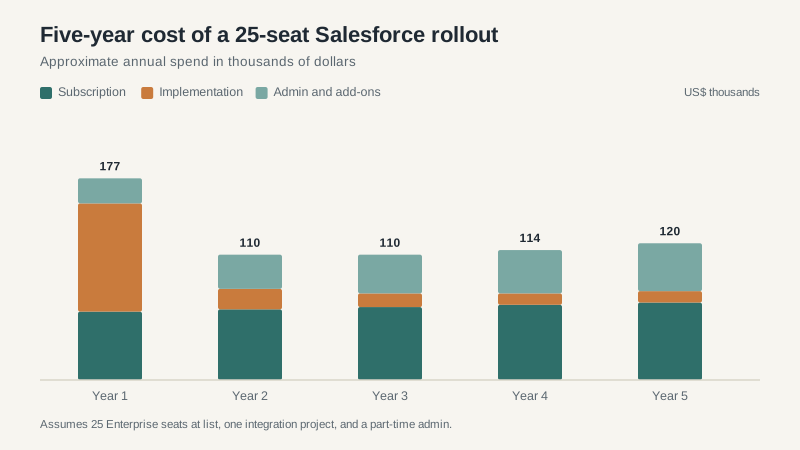
Notice the shape of that chart. Year one is heavy, and the years after are not cheap either, because admin and add-on costs grow while implementation falls away. Teams that model only year one routinely under-budget by a third.
Where the money leaks
Three line items account for most of the surprise.
Add-on licenses. Salesforce’s core products are modular. Field Service, Marketing Cloud, Data Cloud, and the various AI products are priced separately, often per user or per credit. A deal that starts with Sales Cloud quietly grows three more product lines by year two because each one solved an adjacent problem.
Partner change orders. Fixed-fee implementation contracts rarely stay fixed. A workshop runs long, a legacy report has no equivalent, a data field needs a transformation nobody scoped. Change orders bill at $150 to $250 an hour. A $180,000 project landing at $260,000 is a normal outcome, not a scandal.
Custom code. Every line of Apex or custom component is something you own forever. It breaks on upgrades, it needs a developer to change, and it is the reason some companies feel trapped. Flow and standard configuration age far better. If a partner proposes code for something Flow can do, ask why.
The parts that are genuinely excellent
I do not want to leave the impression that this is a bad product. It is not. Two things are better than anything else I have used.
The reporting and forecasting layer, once it is set up properly, gives a sales leader a real view of the quarter without exporting anything. And the ecosystem is unmatched: whatever you need to connect, someone has already built a connector, and whatever you need to hire, someone already knows the tooling. That second point matters more than buyers expect. The cost of finding a Salesforce administrator is lower than the cost of finding an administrator for a niche platform, and that discount compounds over a decade.
How I would buy it
Write down your three worst process exceptions before you take a demo. For most companies that is a discount approval that needs two signatures, a renewal that has to route through a partner, and a quote that has to match a specific template. Make the vendor show you all three in their system, in a sandbox, with your data shape.
Then ask two questions that separate good partners from order-takers. First: who will be on my project, and how many other projects are they running? Second: what did your last comparable project cost at signing, and what did it cost at the end? The second question is uncomfortable, which is exactly why the answer is useful.
Buy one edition higher than you think you need if the difference is a sandbox and API access. Buy one edition lower if the difference is features you cannot describe in a sentence. And budget the admin role in year one, not year three, because a system nobody tends is a system that gets abandoned.
If you are still deciding between platforms rather than editions, the comparison in our best CRM software guide is a better starting point. If you are weighing a lighter alternative, the HubSpot CRM breakdown covers the tradeoff in the other direction.
