The first monday CRM build I did took three days. The Salesforce build it replaced had taken six weeks. The client was delighted for about five months, and then a new sales manager asked for a forecast by rep and by product line, and we discovered that the board that made everything fast had also made one specific thing hard.
That is the honest trade with monday CRM. It gives you a working system almost immediately, and it asks you to own the design decisions a dedicated CRM would have made for you. Whether that is a good deal depends entirely on who is doing the owning.
What it is, underneath
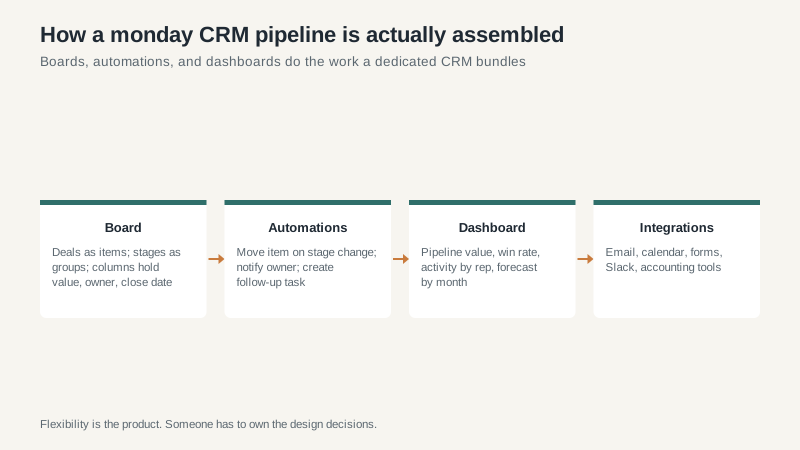
monday CRM is a sales template on top of monday.com’s work management platform. Deals are items on a board. Pipeline stages are groups. Columns hold the value, the owner, the close date, the next step. Automations move items when something changes. Dashboards roll the boards up into numbers.
That is the whole architecture, and it explains both the appeal and the ceiling. It is a spreadsheet with a social life, and I mean that as a compliment. Anyone who has used a spreadsheet can learn it in an afternoon.
Where it beats a dedicated CRM
Speed to first value is the obvious one. A board, a few columns, an automation that notifies the owner when a deal goes quiet, and you are running. No implementation partner, no data model workshop, no six-week wait for a sandbox.
Flexibility is the second. If your process has a step that no CRM vendor anticipated, you add a group or a column. You do not file a feature request. For companies that sell in an unusual way, that is worth a lot.
The third advantage is organizational rather than functional. If your delivery team, your onboarding team, and your account managers already live in monday.com, putting sales there removes a boundary. The handoff from “closed won” to “project kickoff” is a status change instead of an integration. I have seen that single change do more for cross-team accountability than any CRM feature.
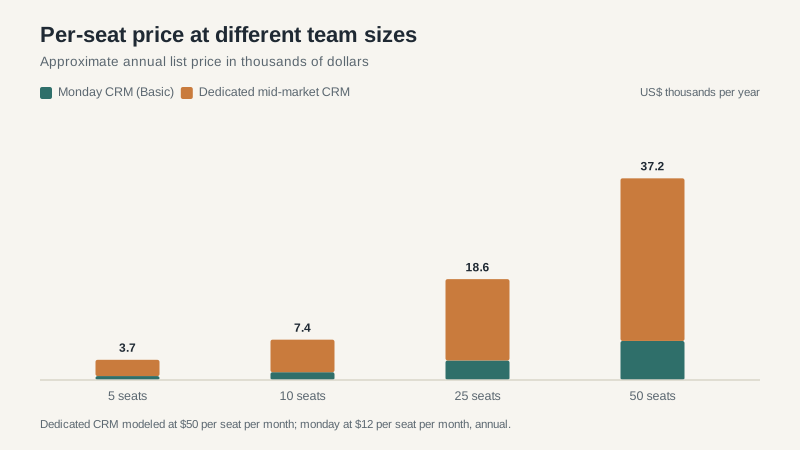
And the price is genuinely low at the entry tier. Basic runs around $12 per seat per month billed annually. For a small team that mostly needs visibility, that is hard to argue with.
Where it runs out of road
Reporting is the first wall, and it is the wall most teams hit. monday’s dashboards are good at counting things on a board. They are less good at the kind of multi-object analysis a sales leader eventually wants: pipeline by segment by rep by quarter, with a comparison to last year. You can usually get there. It takes more configuration than you expect, and sometimes it takes a third-party connector.
Data hygiene is the second. A dedicated CRM enforces some structure. monday lets you create whatever you want, which means six months in you have three boards that overlap, two columns that mean the same thing, and a deal that exists twice. I have never seen a monday instance that did not need a cleanup at the one-year mark. The good ones schedule it.
Email and calendar integration is fine but not as deep as HubSpot’s. If your reps live in Gmail and you want every thread logged automatically with full context, you will notice the difference.
And there is a governance cost. Someone has to decide what the board looks like and defend that decision. In a dedicated CRM, that person is called an admin and the role is understood. In monday, it is usually the ops lead who also does four other jobs.
What the pricing looks like at each tier
Basic gets you the essentials: unlimited boards, a reasonable number of automations per month, and simple dashboards. Standard adds more automation runs and integrations, which is the tier most teams actually need once they have more than about ten people. Pro adds reporting depth and permission controls that matter if you are handing a board to a partner or an outside sales team.
Automation runs are the limit to watch. monday prices by action volume as well as seats, and a busy team can burn through a month’s allowance faster than expected if an automation fires on every field change. I have seen a board configured to notify on every update generate hundreds of actions a day for a change nobody read. Check your action usage in the first month, before the pattern hardens.
The migration question
Moving to monday from a dedicated CRM is easier than moving the other direction, because you can shape the board to match your old data. Moving out is the harder path: your deal history lives in boards, and reconstructing a proper relational model from that takes planning. Export early and often, and keep a copy of your data outside the tool.
If you are moving from spreadsheets, which is the more common case, do not import everything. Import open deals and the last twelve months of closed ones. Older history is a comfort object, not a business asset, and it will make your first board slow and noisy.
Who it fits
monday CRM fits companies where the sales process is simple, the team is small to mid-sized, and someone internal enjoys building things. It fits especially well when sales is not the only team that needs the data.
It fits badly when you have complex approval chains, a large partner channel, territory rules, or a leadership team that wants a forecast they can defend to a board. In those cases the flexibility becomes a tax, and you spend more time building the CRM than using it. Our Salesforce guide covers what the other end of that spectrum looks like.
If you are somewhere in the middle and unsure, the comparison framework in the best CRM software guide is built for exactly this decision. And if you are weighing monday against a lighter pipeline tool, the honest test is whether you need the rest of the platform. If sales is the only team that will use it, a dedicated CRM is usually the better buy. If the whole company is already there, monday wins on friction, and friction is what kills adoption.
