SFDC is what Salesforce people call Salesforce when they are talking to each other. It is not a product name, it is not a different edition, and it does not mean anything specific beyond the company whose stock ticker happens to be CRM. I have sat in meetings where three people used the term and none of them meant the same thing, which is a decent metaphor for how the platform is usually implemented.
This piece is for two readers: the person who just got handed “the SFDC project” and has no idea what they inherited, and the manager who keeps hearing the acronym and wants to know what it actually covers.
Where the name comes from
Salesforce.com was the original company name, and SFDC is the shorthand that grew out of it: San Francisco Development Company, or Salesforce Dot Com, depending on who is telling the story. Both versions circulate and nobody has ever settled it. What matters is that the term survived the rebrand, and it now functions as insider vocabulary. When a recruiter lists “SFDC experience” they mean the platform, not the company.
That insider quality is worth noticing. A vendor that has its own dialect has a trained labor market, and a trained labor market is a real asset. It is also a real cost, because you are now hiring for a vocabulary as much as a skill.
What “SFDC” actually covers
The confusion is that Salesforce is a platform with several products on top of it, and SFDC gets used for all of them.
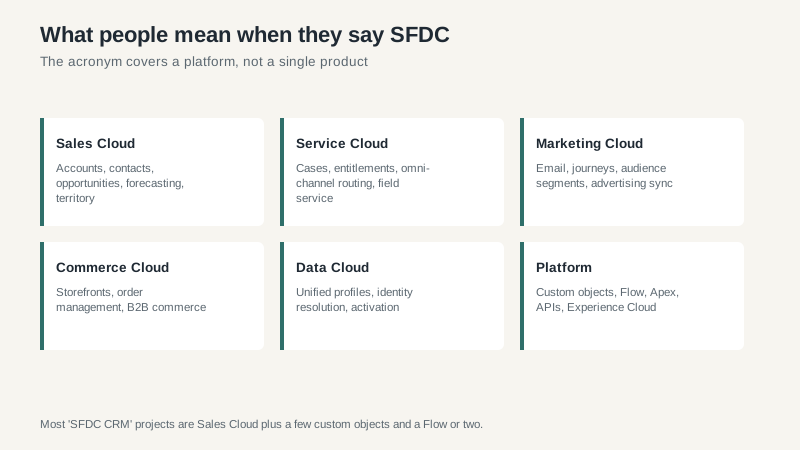
In practice, most companies saying “our SFDC” mean Sales Cloud with a few custom objects and a couple of Flows. Service Cloud is a separate product with a separate license. Marketing Cloud is a separate product that is, historically, a completely different codebase with a different interface. When someone promises you “one platform,” ask which product each team will actually be logging into.
The vocabulary that trips up new admins
A short glossary, because most of the confusion in a first Salesforce job is linguistic rather than technical.
Objects are tables. Accounts, Contacts, Opportunities, Leads, Cases. Custom objects are tables you add. Fields are columns. Records are rows.
Profiles and permission sets control what a user can see and do. Profiles are the old model and are being phased toward permission sets. If you inherit a system built before 2018, it probably has one profile per department and a permission set nobody remembers creating.
Flows are the automation tool. They replaced Workflow Rules and Process Builder, which are legacy and should be migrated off. If you find Process Builder still doing work in 2026, that is your first cleanup project.
Sandboxes are copies of your org for testing. A developer sandbox is empty data with your configuration. A full sandbox is a complete copy and costs extra. Testing in production is how companies lose a weekend.
Validation rules block a save when a condition is met. They are the most common source of “the system won’t let me do my job” complaints, and nine times out of ten the rule was added for a report someone no longer uses.
The five habits that separate a good admin from a busy one
I have worked with maybe thirty Salesforce administrators at this point. The good ones share habits that have nothing to do with certifications.
They ask why before they build. A request for a new field is usually a request for a report, and a request for a report is sometimes a request for a process change that has nothing to do with the system.
They write things down. Which Flow does what, who asked for it, and when it can be deleted. The orgs that rot are the ones where nobody can explain why an automation exists.
They test in a sandbox and they tell people they are testing. The surprise release is what breaks trust with a sales team.
They say no to custom code when Flow will do. Every line of Apex is a permanent liability that has to survive three releases a year.
And they keep a list of what they would delete if they had a free week. That list is the best indicator of whether an org is healthy.
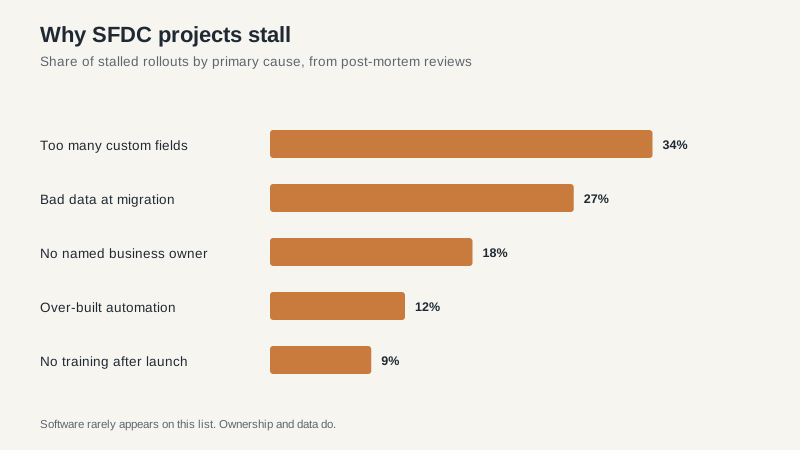
Why projects stall, in order
Those percentages come from my own post-mortem notes across a decade of rebuilds, not from a survey, so treat them as directional. But the ordering has been stable.
Too many custom fields is the top cause and it is entirely self-inflicted. Every field is a decision a rep has to make, and after about forty of them the rep stops making decisions and starts typing garbage to get past the screen. I have deleted 200 fields from an org and watched adoption improve within a month.
Bad data at migration is second. Salesforce will happily import your duplicates. It will not tell you that three of your top twenty accounts are the same company.
No named business owner is third, and it is the one that kills projects quietly. An admin can maintain a system. Only a business owner can decide what the system should do.
If you just inherited an org
Do not change anything for the first two weeks. Export a list of every field, every Flow, every validation rule, and every report, and find out who uses each one. Then ask three sales reps what annoys them most. Their answers will be more useful than any audit tool, and they will tell you which of the twelve dashboards nobody opens.
Then pick one small, visible improvement and ship it. Trust in an admin is built by shipping, not by auditing. Once the sales floor believes you can fix things, the harder cleanup gets easier.
If you are evaluating the platform rather than inheriting it, the Salesforce CRM guide covers editions and five-year costs, and the comparison of CRM options is the better starting point if you have not committed to the ecosystem yet.
