A free CRM is not a marketing trick. It is a customer acquisition strategy, and it works because the free tier is genuinely useful right up to the moment it is not. The trick is knowing where that moment is before you get there, so the upgrade is a budget line instead of an emergency.
I have set up free CRMs for maybe twenty small businesses over the years, everything from a two-person landscaping company to a six-person insurance agency. The pattern is consistent: free works for longer than people expect, and then it stops working all at once.
What “free” actually means
Free CRMs generally give you unlimited or generous contact storage, one or two pipelines, basic email integration, and a mobile app. What they withhold is almost always the same three things: user seats, automation, and support.
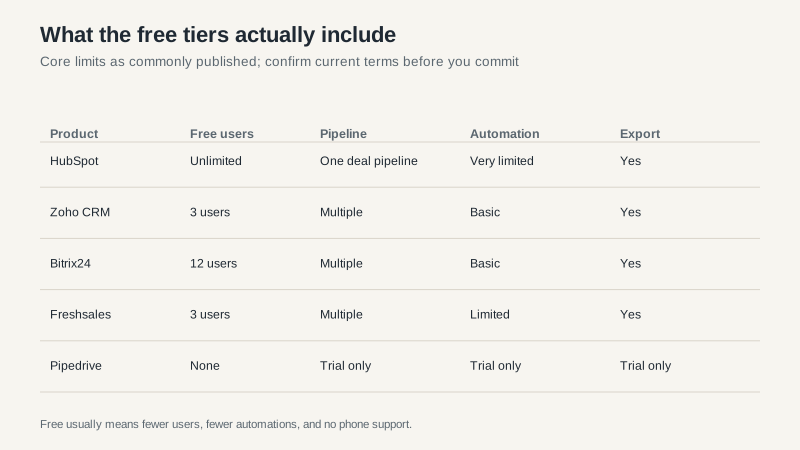
Those limits are published and they change, so verify before you commit. But the shape is stable. HubSpot is the most generous on users and the stingiest on automation. Zoho and Freshsales trade seats for capability. Pipedrive does not offer a free plan at all, only a trial, which is worth knowing if someone tells you it is free.
The cost that does not appear on the pricing page
Free software costs time. Every task the paid tier would automate, someone does by hand. Copying a lead from an email into a record. Remembering to follow up. Building the report in a spreadsheet because the free dashboard will not do it.
For a solo operator doing ten deals a month, that is maybe three hours a week, and it is fine. For a five-person team doing eighty deals a month, it is twenty hours a week, and the math changes completely. Twenty hours at a loaded rate of $35 is $700 a week. The “expensive” $50-per-seat plan costs $1,000 a month for five people.
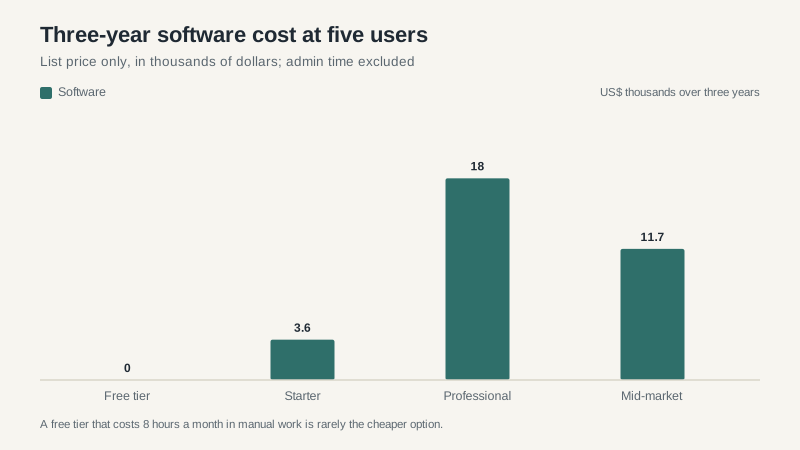
That chart only counts license cost, which is why it is misleading on its own. The free bar is zero and the real cost is the labor you are not counting. When I model this for clients, the free tier usually loses somewhere between four and eight users, depending on how much of the process is manual.
When free stops being enough
There are four triggers, and they tend to arrive in this order.
You hire the fourth person. Most free tiers cap at one to three users. The moment you need a second salesperson to see the same pipeline, you are paying.
You need a second pipeline. One pipeline covers “sales.” It does not cover renewals, partnerships, and a separate service motion. The second pipeline is usually the real upgrade trigger, not the seat count.
You need an automation that does more than notify. Sending an email when a deal moves is table stakes. Creating a task, assigning it, and updating a field on a schedule is where the paywall starts.
You need someone to answer the phone. Free tiers get community support. When the system holds your revenue and something breaks on a Friday, community support is not a support plan.
What the free tier will not do for you
Three things, and it is worth going in with eyes open.
A free CRM will not clean your data. It will hold whatever you put in, including the duplicate customer you have been meaning to merge since 2021. The tools that do automated deduplication are paid, and the ones built into free tiers are basic at best.
It will not replace a process. If nobody has ever agreed on what a qualified lead looks like, the free tier will faithfully record the disagreement. The upgrade does not fix that either, which is why I always ask about the process before I ask about the software.
And it will not give you a person to call. Community forums are genuinely helpful for “how do I add a field” questions. They are not helpful when the export breaks on the day you need to file a quarter-end report. If your business runs on the system, buy a support plan or accept that you are your own support plan.
How I would choose
Start with the free tier of the product you would want to grow into, not the free tier of the product that is easiest to set up. Migration is annoying and the cost of switching later is higher than the cost of paying now. If you think you will need marketing automation in two years, starting on HubSpot’s free CRM is smarter than starting on a tool you will have to leave.
Then set a review date. Pick a specific number, say twelve open deals or four users, and agree that when you hit it, you will look at the paid tiers. Without a trigger, free becomes permanent by inertia, and the manual work compounds quietly.
And check the export before you import anything. Export your contacts to a CSV on day one, and again every quarter. If a free tool will not let you export, that is not a free tool, that is a hostage situation. I have watched a company spend three weeks extracting customer records from a “free” CRM that had changed its export policy. Nobody saw that coming and it cost them a customer.
The honest recommendation
For a solo consultant or a two-person shop, HubSpot’s free CRM is the best starting point, mostly because the ceiling is high and the migration path is smooth. For a small team that wants more structure and does not mind a less polished interface, Zoho’s free tier is a reasonable second look.
For a team of five or more with a real pipeline, skip free entirely and buy the cheapest paid tier that includes automation and a second pipeline. The labor you save in the first month usually covers the subscription for the year.
If you are comparing paid options rather than free ones, our best CRM software guide covers the decision framework, and the HubSpot pricing breakdown explains what happens when you outgrow the free plan specifically.
